 Reachlee Docs
Segments
Saved filters that always show who matches right now, with examples, every filter explained, and how to use them in campaigns.
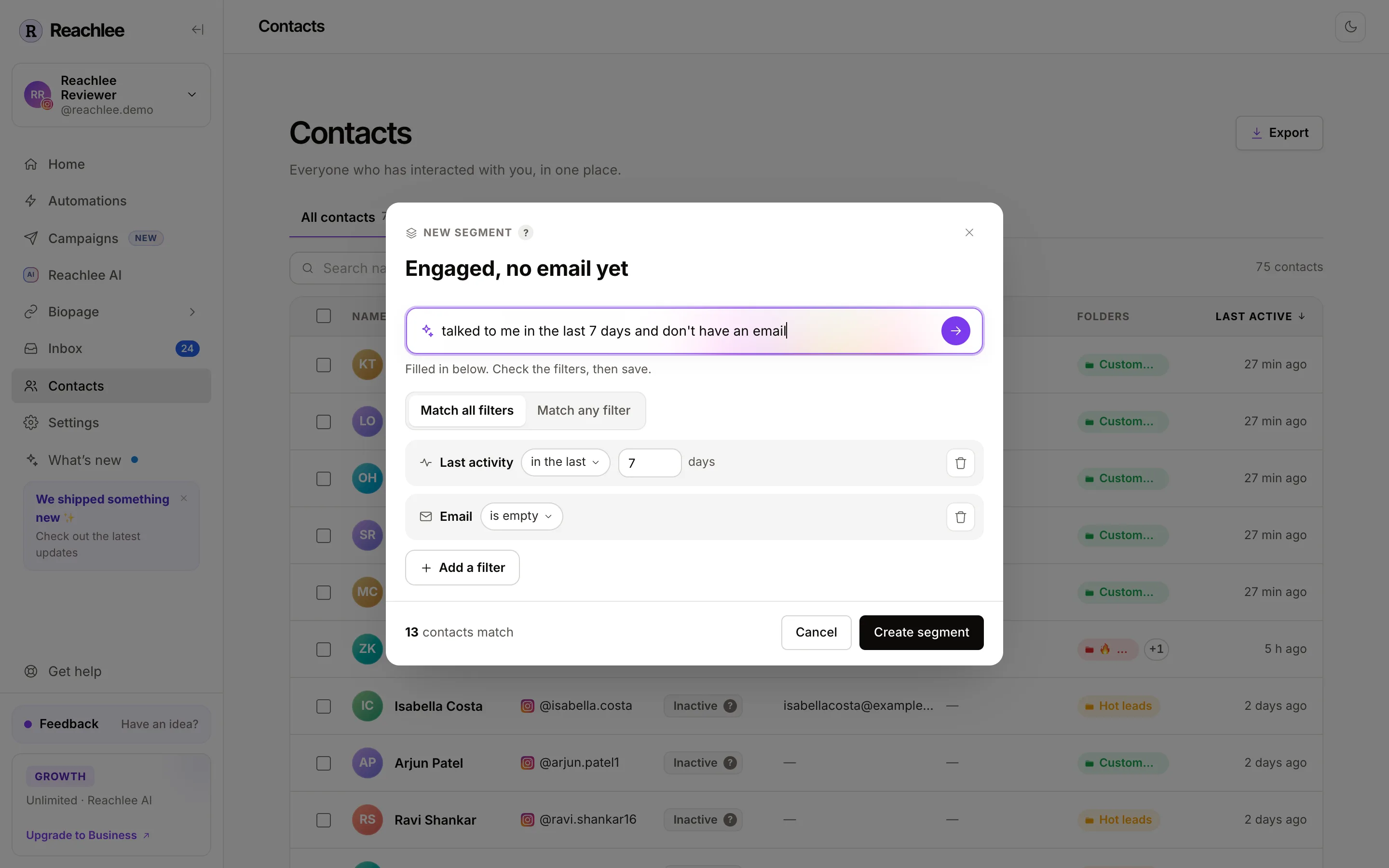
A segment is a saved filter, such as "people who messaged me in the last 7 days and have no email yet". Reachlee works out who matches every time you open it, so a segment is never out of date. Nobody is added or removed by hand.
Segments appear as tabs above the Contacts table, next to All contacts.

Folders or segments?
| Folder | Segment | |
|---|---|---|
| Who decides who's in it | You, an automation or a campaign step | A rule you save once |
| Changes over time | Only when someone adds or removes people | By itself, as people message, click or share info |
| Good for | Customers, VIPs, collab requests, anything you judge | Activity, engagement, missing info, follower status |
| Use in a campaign audience | Yes | Yes |
Many people use both: a segment finds the right people, then a campaign step files the ones who reply into a folder.
Create a segment
- Open Contacts and click Create segment at the end of the tabs.
- Give it a name.
- Describe who belongs in plain words and press Enter, or click Add a filter and build it yourself. A description fills in the filters for you, so check them before saving.
- Choose Match all filters (everyone must meet every filter) or Match any filter (meeting one is enough).
- The footer shows how many contacts match. Click Create segment.
You can also start from Filters: build the filter, check the table, then click Save as segment.
Each segment tab has a ⋯ menu with Edit segment, Duplicate segment and Delete segment. Deleting a segment removes the saved filter only. Nobody leaves your contacts or any folder.
Example segments
| Segment | Filters | Why it's useful |
|---|---|---|
| Can DM right now | Status is Active | Everyone a campaign reaches the moment you send |
| Engaged, no email yet | Last activity in the last 7 days, and Email is empty | A Collect emails campaign while they're warm |
| Has email | Email is set | Export to your newsletter or a Meta Ads audience |
| Clicked but quiet | Clicked a link at any time, and Messaged you more than 14 days ago | A reminder or a discount nudge |
| Big accounts | Follower count at least 5,000 | Collab and UGC outreach |
| Not following yet | Follows you is no, and Last activity in the last 30 days | An Ask for a follow campaign |
| Unsorted | Folder is in no folder | Review new people and file them |
| Commenters who never DM'd | Commented at any time, and Status is Pending | People to win over with comment-to-DM automations, since campaigns can't reach them yet |
Every filter explained
Filters are grouped the same way in Add a filter.
Engagement
| Filter | Matches people who | Options |
|---|---|---|
| Last activity | Sent a message, comment or story reply within a time range | in the last N days, more than N days ago, never |
| First seen | Became a contact within a time range | in the last N days, more than N days ago |
| Messaged you | Sent a DM, replied to a story or tapped a button | in the last N days, more than N days ago, at any time, never |
| Commented | Commented on any of your posts | in the last N days, more than N days ago, at any time, never |
| Clicked a link | Clicked a tracked link you sent, from any automation or one you pick | at any time, in the last N days, never |
Automations & AI
| Filter | Matches people who | Options |
|---|---|---|
| Got an automation DM | Received a DM from any automation, or one you pick | at any time, in the last N days, never |
| Reachlee AI replied | Got a reply from Reachlee AI | yes, no |
Contact info
| Filter | Matches people whose | Options |
|---|---|---|
| Folder | Folder membership | is in, is not in, is in any folder, is in no folder |
| Status | Status is Active, Pending, Inactive or Opted out | is, is not |
| Follows you | Account follows yours | yes, no, not known yet |
| You follow them | Your account follows theirs | yes, no, not known yet |
| Email was captured in a DM or added by hand | is set, is empty, contains | |
| Phone | Phone was captured or added | is set, is empty, starts with |
| Name | Profile name | contains, doesn't contain, is set, is empty |
| Username | @handle | contains, is, is set, is empty |
| Follower count | Number of followers, known once they've messaged you | at least, at most |
"Not known yet" means Reachlee hasn't been able to check the follow status for that person. Follow status is checked when people interact with an automation or campaign.
Using segments in campaigns
In a campaign's audience pane, choose Specific folders or segments, open Segments and tick the ones you want. The campaign works out who matches at the moment you send. People who match later aren't added.
Use Don't send campaign to with a segment to leave people out, for example Customers when you're sending a sales offer. See Audience and rules.
Plan limits
| Plan | Saved segments |
|---|---|
| Free | 3 |
| Pro, Growth, Business | Unlimited |
Filtering without saving is unlimited on every plan.