 Reachlee Docs
Audience and rules
Choose who receives a campaign, leave people out, and decide how latecomers, repeat messages and replies are handled.
The left pane of the editor shows the audience and rules whenever no step is selected. If a step is open, click the back arrow at the top of the pane.
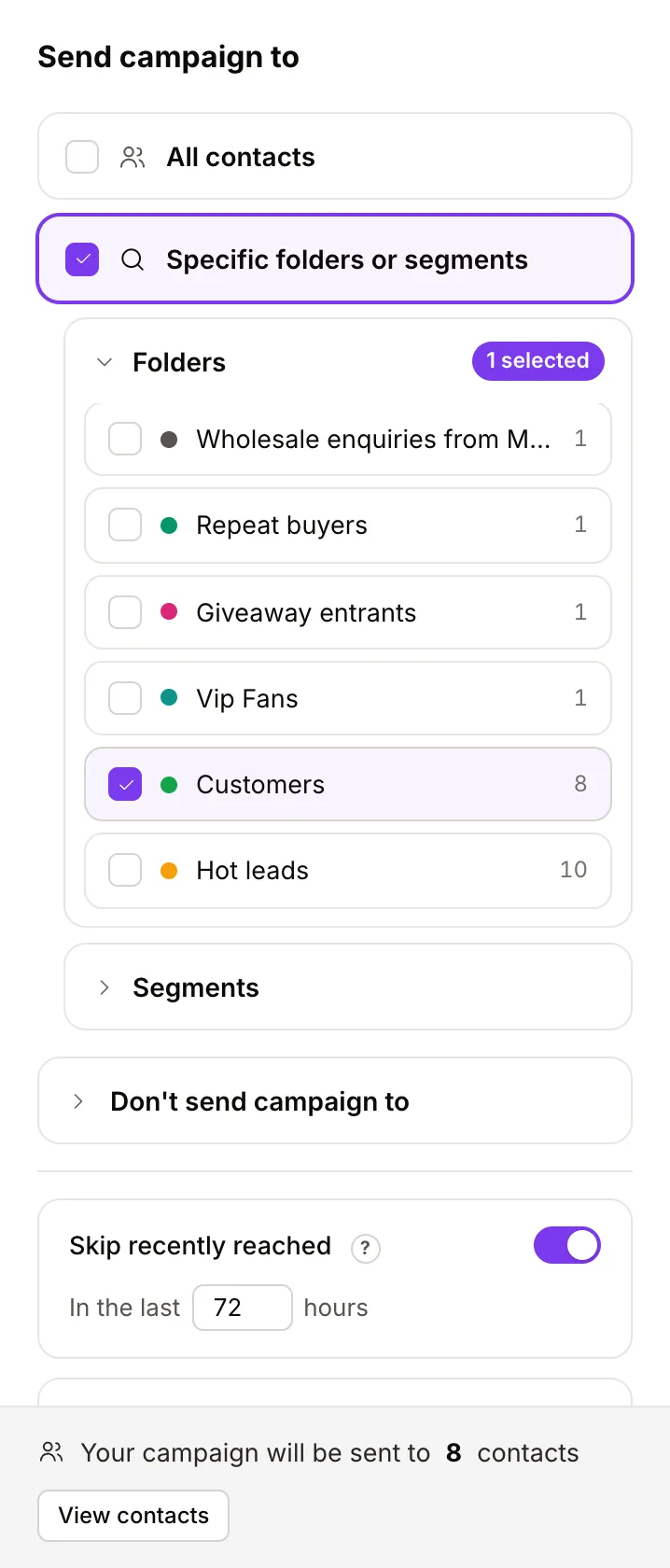
Send campaign to
Pick one:
- All contacts. Everyone on this connected account.
- Specific folders or segments. Open Folders or Segments and tick as many as you like. People in more than one are only messaged once. Use the search box to find a folder in a long list.
- Hand-picked people. When you start a campaign from a selection on the Contacts page, the audience is exactly the people you selected.
The folders here are contact folders, the ones you add people to on the Contacts page. Campaign folders, which organise the campaigns list, never show here. See Campaign folders vs contact folders.
Don't send campaign to
Open Don't send campaign to and tick folders or segments to exclude. An exclusion always wins: anyone in an excluded folder or segment is left out even if they're also in the audience.
Common exclusions:
- Customers, when the campaign is a sales offer.
- Collab requests, when the campaign is for fans.
- A segment like Has email, when the campaign collects emails.
The audience count
The footer reads Your campaign will be sent to N contacts. Click View contacts to see exactly who is in it.
The count is everyone in the audience. How many of them get it right away depends on the 24-hour rule, and the send dialog shows that number before you confirm.
Rules
Skip recently reached
On by default, set to 72 hours. Anyone another campaign messaged within that many hours is left out, so nobody gets two campaigns in a row. Change the hours, up to 30 days, or switch it off.
People left out this way show as Skipped: reached by another campaign in the results.
Keep it open
Pro and above. Default 7 days, up to 30.
Instagram and Facebook only let you DM people who messaged you in the last 24 hours. With Keep it open on, everyone else in the audience waits; the moment one of them messages you, they get the campaign. When the days run out, anyone still waiting is marked never became reachable in time and the campaign finishes.
Without it, the campaign only reaches people who are Active when you send.
Stop on reply
On by default. If someone replies in the middle of a sequence, and that step wasn't waiting for an answer, the rest of their sequence doesn't send. You take the conversation from there in the Inbox.
Answers to an Ask a question, Ask for an email or phone, Wait for a reply or Ask for a follow step don't count as interrupting; they're what the step was waiting for.
Switch it off for announcement-style sequences where the next messages should go out whatever people say.
Who never receives a campaign
- People who opted out, by asking or through an Opt out step or bulk action.
- Pending contacts, who never sent you a DM.
- People in an excluded folder or segment.
- People skipped by Skip recently reached.