 Reachlee Docs
Results
Read a campaign's numbers, follow every recipient, download the answers, and file the people who replied into a folder.
Open a campaign that has been sent to see its results. They update live while the campaign is sending or waiting.
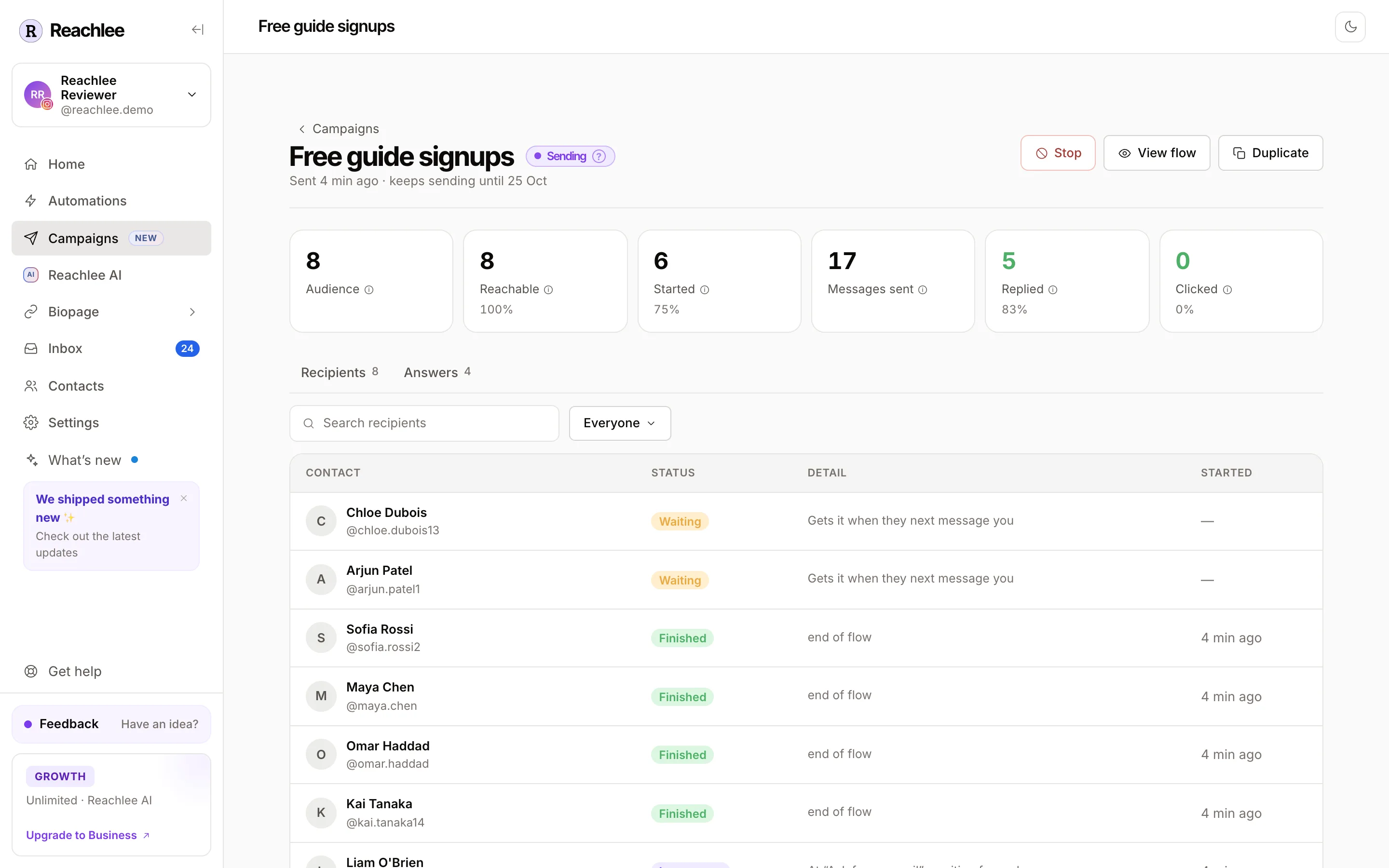
The tiles
| Tile | What it counts |
|---|---|
| Audience | Everyone the campaign was sent to, after exclusions. |
| Reachable | How many could be messaged, now or when they messaged you while the campaign was open. The percentage is of the audience. |
| Started | People who began the sequence. |
| Messages sent | Every DM the campaign delivered, across all steps. Tests aren't counted. |
| Replied | People who wrote back while their sequence was running, including answers to questions. The percentage is of people who started. |
| Clicked | People who clicked a tracked link or link button. The percentage is of people who started. |
Hover the ⓘ on a tile for its definition.
Recipients
Every person in the audience, with their status, what's happening to them and when they started. Search by name, or filter by status with the Everyone menu.
| Status | Meaning |
|---|---|
| Waiting | Not reachable yet. Gets it when they next message you, while the campaign is open. |
| In progress | Mid-sequence. The detail shows the step they're on, and whether it's waiting for a reply or a click. |
| Finished | Reached the end of their path. |
| Replied | Their sequence ended because they replied and Stop on reply is on. Take it from there in the Inbox. |
| Skipped | Never started. The detail says why. |
| Failed | Instagram or Messenger refused a message. |
| Stopped | You stopped the campaign while they were mid-sequence. |
Why someone was skipped
| Detail | What it means |
|---|---|
| never messaged you | A Pending contact. Meta doesn't allow the first message to come from you. |
| opted out | They opted out of your messages. |
| reached by another campaign | Skip recently reached left them out. |
| never became reachable in time | They didn't message you before the campaign closed. |
| couldn't be messaged any more | Their 24-hour window closed mid-sequence. |
| monthly DM limit reached | Your plan's DM allowance for the month ran out. |
| account was paused | The account was paused, for example to reconnect it. |
| Instagram refused the message | Meta rejected the send. Check the account's connection in Settings. |
| campaign stopped | You stopped the campaign before they started. |
Add recipients to a folder
Filter the recipients to Finished or Replied, then click Add to folder and pick a contact folder. Everyone in that filter is added in one go, for example to follow up with everyone who finished a launch campaign.
Answers
The Answers tab appears when the sequence has a question or an email or phone step. It lists every answer: who gave it, which question, the answer and when.
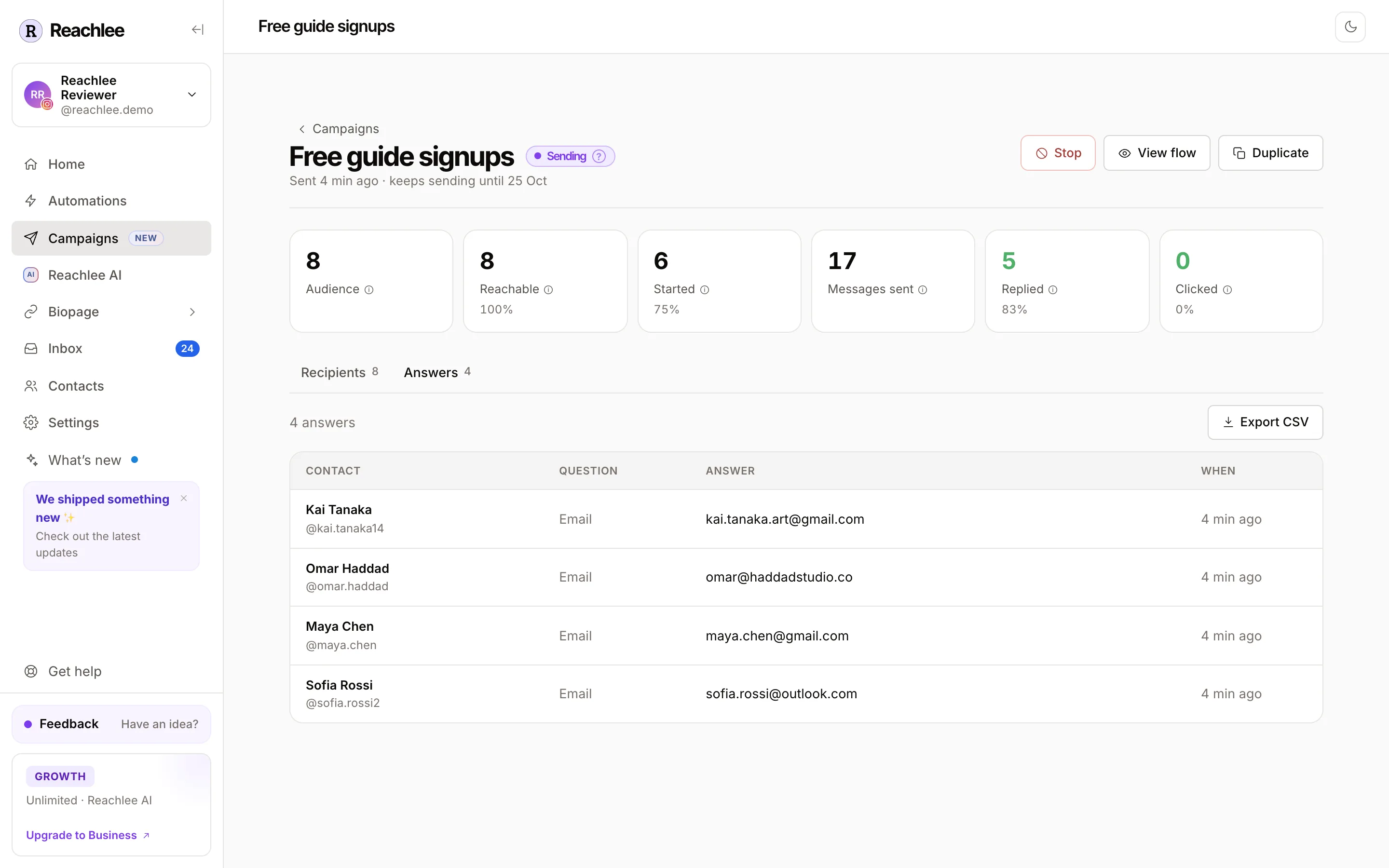
Export CSV (Pro and above) downloads all answers as a spreadsheet, one row per answer. Emails and phone numbers are also saved to each contact, so they show in Contacts and in contact exports on every plan.
On the campaigns list
The Campaigns page shows audience, messages sent, replied and clicked for every campaign, and totals for each campaign folder.
Test, send and schedule
Walk through a campaign in the phone preview, send a real test to yourself, then send it now or at a time you choose.
Organise campaigns
Campaign folders, searching and filtering the list, bulk actions, duplicating and deleting, and how campaign folders differ from contact folders.