 Reachlee Docs
What are campaigns?
Send a DM sequence to the contacts you choose, and let their replies decide what each person gets next.
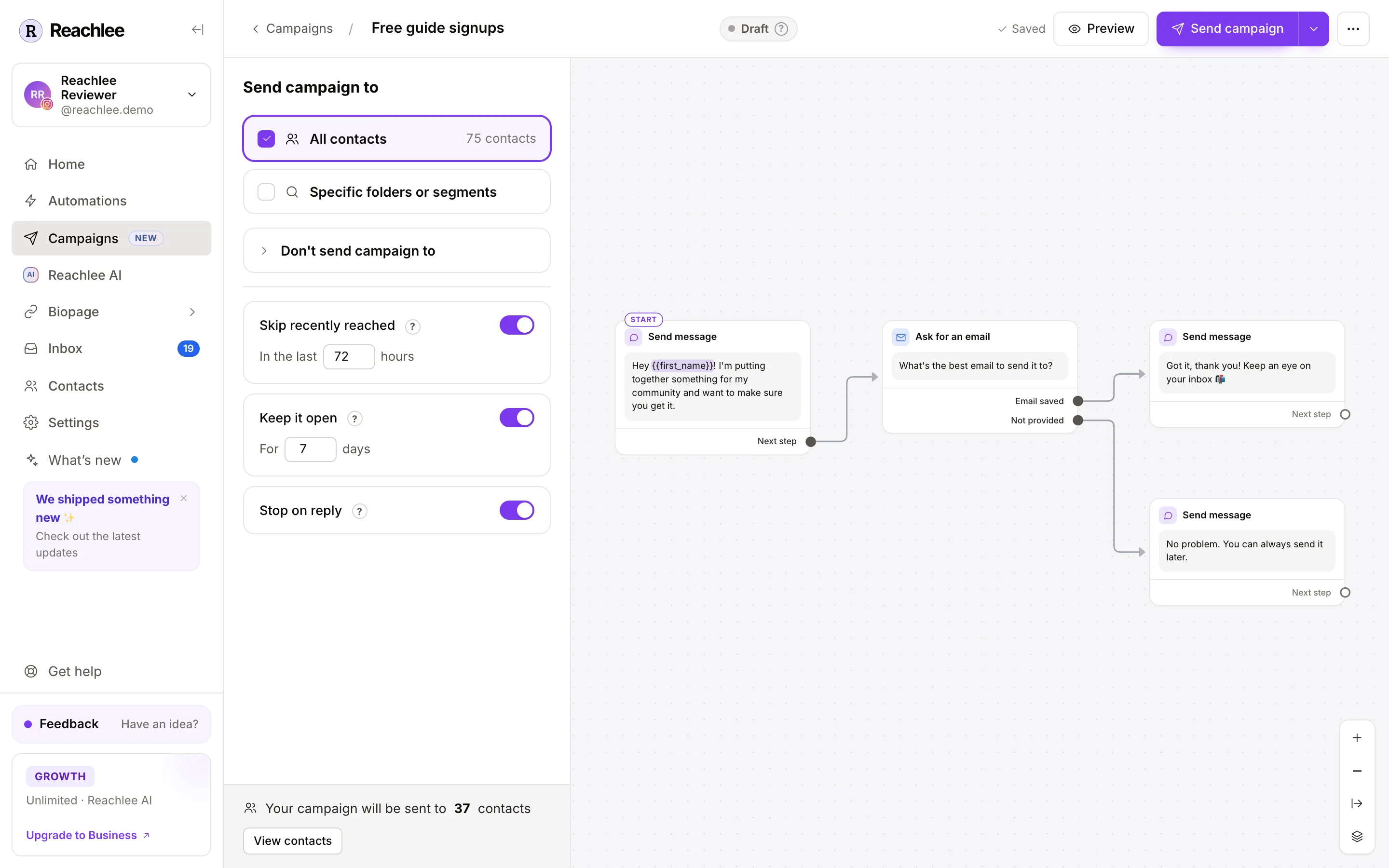
A campaign is a sequence of DMs you send to a group of your contacts. You choose who gets it, build the messages on a canvas, then send it now or schedule it. Each person moves through the sequence on their own: a question waits for their answer, a link waits for their click, and each answer can lead to a different next message.
Campaigns and automations
Both send DMs from your connected account. The difference is who starts.
| Automations | Campaigns | |
|---|---|---|
| Starts when | Someone comments, sends a keyword, replies to a story | You click Send campaign, or at the time you schedule |
| Who gets it | Whoever triggers it, one person at a time | The audience you pick: all contacts, folders or segments |
| Runs | Always on, until you pause it | Once, then stays open for latecomers if you choose |
| Typical use | Send a link to everyone who comments "GUIDE" | Tell your existing contacts about a launch, collect emails, ask a question |
Use an automation to respond. Use a campaign to reach out to people who already know you.
What you can do with a campaign
- Announce something. A launch, a new product, a drop or an event, with a tracked link and a reminder for people who didn't click.
- Collect emails or phone numbers. Ask in the DM; Reachlee checks the reply and saves it to the contact.
- Ask a question. Quick-reply answers branch the conversation and every answer is saved.
- Grow your following. Ask people who don't follow you yet, and check they did.
- Sort your audience. File people into folders based on what they answer.
- Let Reachlee AI write it. A personal message for each person, written from your knowledge base, then AI replies from there.
The 24-hour rule
Meta lets a business DM someone only within 24 hours of that person's last message to you. Every tool on Meta's official API follows this. For a campaign, it means:
- Active contacts, who messaged you in the last 24 hours, get the campaign as soon as you send it.
- Inactive contacts get it the moment they next message you, as long as the campaign is still open. This is what Keep it open controls.
- Pending contacts, who never sent you a DM, can't be messaged by a campaign at all.
- Opted out contacts are never messaged.
The send dialog tells you how many people get it right away before you confirm. See Contact statuses.
Growing the reachable audience
Comment-to-DM automations, story replies and keyword DMs start conversations. Every conversation makes that person Active for 24 hours and reachable by later campaigns while the campaign is open. A campaign works best on an account that already runs automations.
How a campaign works, start to finish
Create it
Start from a template or a blank canvas. The name is optional. Create a campaign
Choose the audience and rules
All contacts, specific folders or segments, or people you picked on the Contacts page. Exclude anyone you don't want to reach. Audience and rules
Build the sequence
Add steps such as messages, questions, links, waits and folders, and connect them into branches. Every step explained
Preview, test and send
Walk through it in the phone preview, send a test to yourself, then send now or schedule it. Test, send and schedule
Read the results
See who was reached, who replied and clicked, every answer, and file the people who replied into a folder. Results
Channels
Campaigns send from whichever connected account is selected at the top of the sidebar: an Instagram professional account or a Facebook Page. Each campaign belongs to one account. The Ask for a follow step only applies on Instagram; on a Facebook Page everyone continues as if they follow.
Plans
Every plan can create campaigns, build any sequence, preview it and send tests. A few steps and settings need a paid plan when you send.
| Feature | Free | Pro | Growth | Business |
|---|---|---|---|---|
| Messages, questions, links, email capture, media, waits, folders | ✓ | ✓ | ✓ | ✓ |
| Send now | ✓ | ✓ | ✓ | ✓ |
| Schedule a send | ✓ | ✓ | ✓ | |
| Keep it open for people who message later | ✓ | ✓ | ✓ | |
| Contact filter, A/B split, Ask for a follow, Email me | ✓ | ✓ | ✓ | |
| Export answers as CSV | ✓ | ✓ | ✓ | |
| AI message, AI condition, Hand over to Reachlee AI, understanding typed replies | ✓ | ✓ | ||
| Add to Google Sheet | ✓ |
Steps your plan doesn't include show a small plan badge. You can still add, edit and test them; the upgrade prompt appears when you send. Campaign DMs count toward your plan's monthly DM limit.